FarmiSpace API
Kawa

FarmiSpace API Reference & User Guide

💡

Overview

This document outlines how to access FarmiSpace platform services via API, covering Farm & Land Management, Index Imagery, Trends & Alerts, Field Scouting Notes, and Member Account Services.

1. Overview

Introduction

Users can access FarmiSpace features and data programmatically via the API, including managing member profiles, lands, indices/analytics, index imagery, and FarmiTags.

💡

Authentication

To access FarmiSpace APIs, you must include an API Key in your requests. Please contact our Sales or Support team to request a test API key.

Service Overview

The FarmiSpace API is organized into the following services. Refer to the specific page in the sidebar for endpoint details.

Service NameDescription
🌱 Farm & Land ManagementLand management (create, rename, delete).
📊 Indices DataAI-Crop and AI-Land indices availability and statistics.
🛰️ Indice ImageryIndices imagery retrieval (GeoTIFF/RGB).
📈 Trends & AlertsAnalytics and alerts (index trends, alarm lists).
🏷️ Field Scouting NotesAnnotation APIs for member lands.
👤 Member & AccountMember profile management.
ℹ️ Service InformationMetadata, versioning, and crop types.
pic1pic2pic3

2. Farm & Land Management

💡

Overview

This service provides access to land management functions, including creating, editing, and deleting land profiles.

2-1. List All Lands

Usage

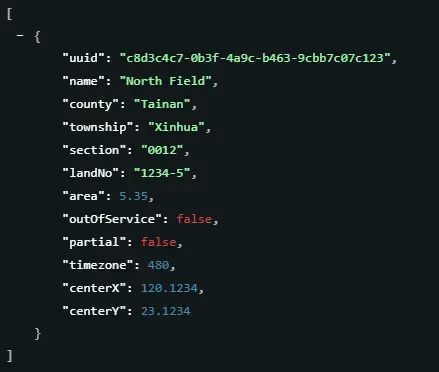
Retrieves a list of all lands accessible by the account, including basic metadata such as area size and coordinates.

Scenarios

  • Map Initialization
    Load all land boundaries (polygons) to display on the map interface upon login, allowing users to see their entire portfolio at a glance.
  • Context Switching
    Populate a dropdown list or sidebar menu, enabling users to select a specific field to view its detailed analytics.

Output

A comprehensive list of land profiles containing names, area sizes, locations (Township/County), and center coordinates for map positioning.
2-1. Lands

2-2. Manage Lands (Create / Rename / Delete)

Usage

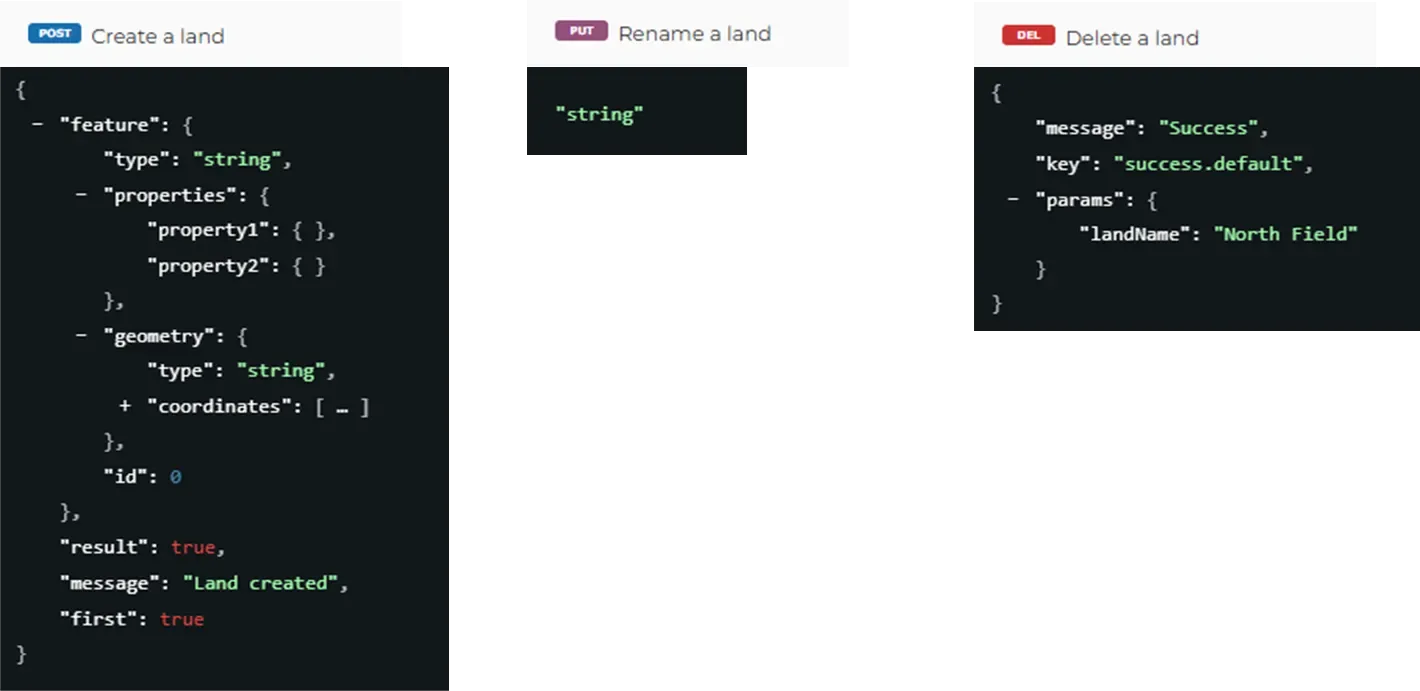
Manages the land lifecycle, including creation (via GeoJSON), renaming, and deletion.
2-2. method

Scenarios

  • Mass Land Management & Sync
    For enterprise clients with hundreds of fields, this API enables batch processing. Scripts can be written to import land boundaries from an internal GIS system or automatically remove lands that are no longer under contract, keeping the database in sync without manual entry.
  • Digitization Onboarding
    When a new user joins, the system can take their land coordinates (GeoJSON) and register them in FarmiSpace to immediately start AI monitoring services.

Output

A confirmation message indicating success or failure, including the unique ID for the newly created land.
2-2. Lands

3. Indices Data

💡

Overview

This service provides access to spectral index data, including available dates and daily statistics (min/max/avg) for specific lands.

3-1. Get Available Dates

Usage

Retrieves a list of dates for which indices imagery is available for a specific land and index (e.g., NDVI).

Scenarios

  • Cloud & Weather Cross-check
    Identify valid data dates to cross-reference with local weather logs (e.g., confirming if a date had clear skies) or to filter out dates with known bad weather before further analysis.
  • Data Availability Check
    Before requesting heavy imagery or detailed statistics, the external system calls this to verify if data exists for a specific date range, preventing empty errors.

Output

A calendar list of dates showing when satellite data is available for selection.
(e.g., ["2024-05-01", "2024-05-12"] )

3-2. Get Daily Statistics

Usage

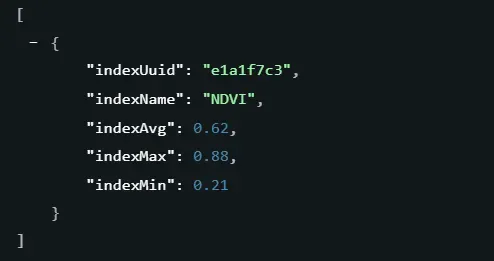
Retrieves statistical data (Min, Max, Avg) for all indices of a specific land on a given date.

Scenarios

  • Quick Health Summary
    Display a summary card (e.g., "Avg NDVI: 0.65") on the dashboard without loading the full map image. This allows users to quickly judge crop health status via numbers.
  • External Data Integration
    Enterprise systems can sync and store these daily statistical values into their own ERP or database to build long-term growth reports or yield prediction models.
  • Third-party Verification Reports
    Generate independent data reports to verify crop growth status for insurance or supply chain audits.

Output

A summary report containing statistical values (Minimum, Maximum, Average) for every index available on that specific day.
(Refers to an array of objects containing index UUID, name, and statistical values.)
3-2. Get Daily Statistics

4. Index Imagery API

Usage

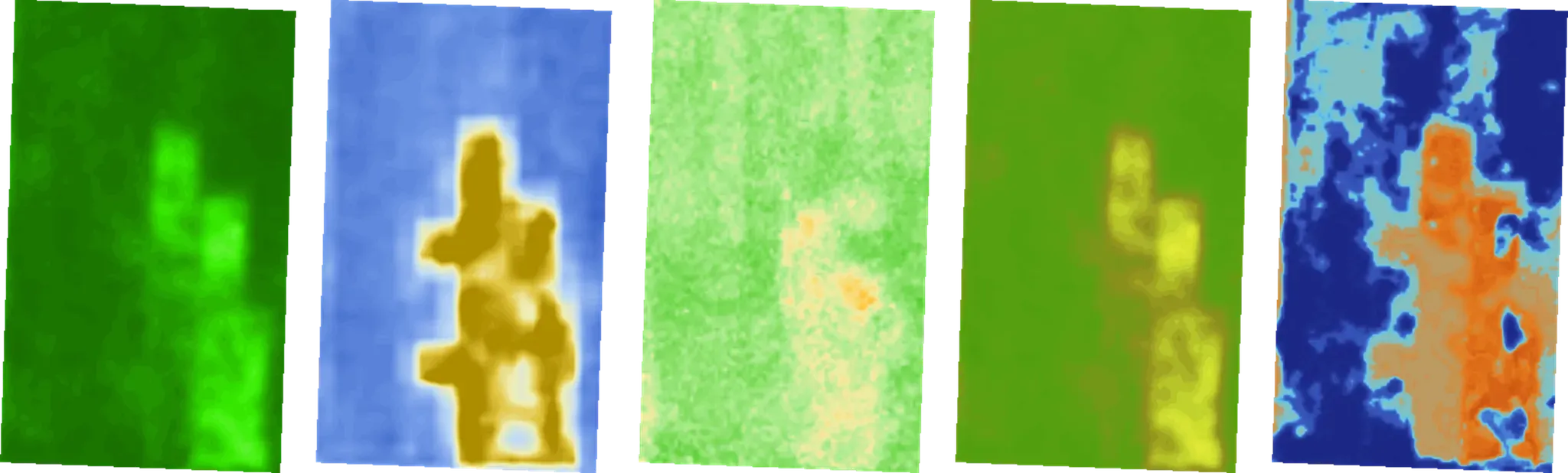
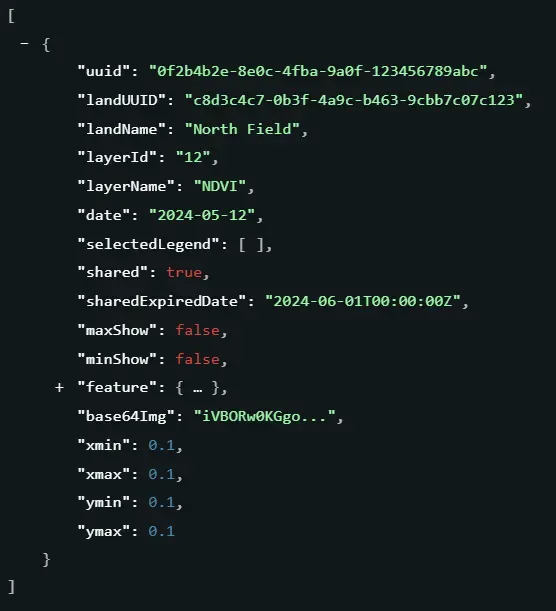
Retrieves the indices image file for a specific field, date, and index, with a grid resolution of 1m x 1m.

Scenarios

  • Visualizing Crop Health Layers
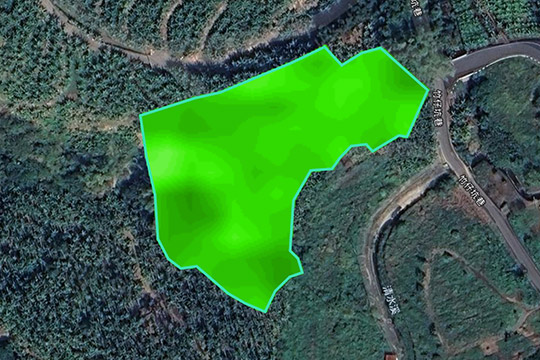
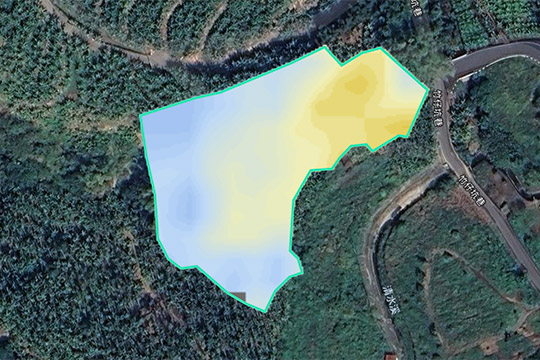
    Use the image to overlay a color-coded heatmap (e.g., NDVI vegetation map) onto your platform's map interface (such as Google Maps or Leaflet). This allows users to visually distinguish between healthy areas (typically green) and stressed areas (typically red) directly on the screen.
  • Report Generation & Archiving
    Retrieve these images to generate downloadable PDF scouting reports for farmers or to archive historical snapshots. This ensures that users have a visual record of their field's condition at specific points in time.

Output

An image package containing the capture date, index details, and image files ready for display on web/mobile apps (Visual RGB) as well as raw data for analysis.
4. Index Imagery API

5. Trends & Alerts

5-1. List Lands with Alerts

Usage

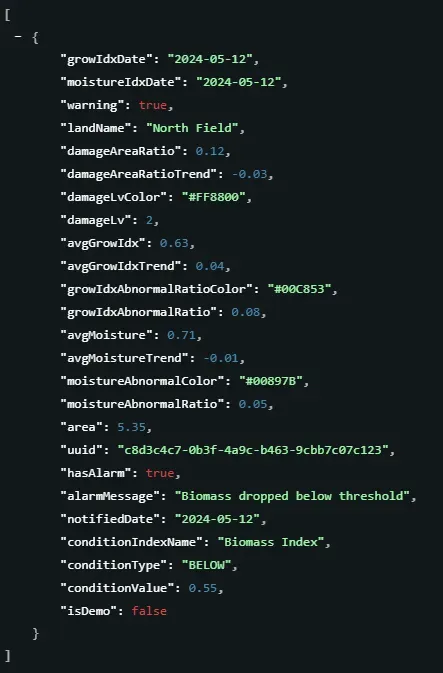
Retrieves the latest analytics data and alert status for all lands, used to filter for fields requiring attention.

Scenarios

  • Smart Risk Prioritization
    Automatically highlights high-risk fields (those with warnings). This helps managers focus their manpower on checking only the problem areas, rather than wasting time inspecting healthy fields.
  • Instant Dashboard Alerts
    Show clear, aggregated alerts (e.g., "5 fields have Growth issues today") on your main dashboard. This gives users an immediate understanding of the farm's situation at a glance.

Output

A summary list of fields requiring attention, including current warning status, alert messages, and damage levels.
5-1. List Lands with Alerts

5-2. Get Index Trends

Usage

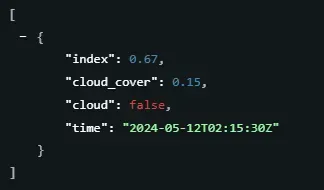
Retrieves time-series trend data for a specific land and index over a designated date range.

Scenarios

  • Growth Curve Visualization
    Plot the historical trend of an index (e.g., NDVI) as a line chart over a season. This visual representation helps agronomists verify if the crop development cycle (vegetative to reproductive stages) is progressing as expected.
  • Performance Benchmarking
    Compare the current trend line against historical data or neighboring fields. A significant deviation or a flatter slope compared to the benchmark can indicate issues like nutrient deficiency or irrigation failure before visual symptoms appear.

Output

A chronological list of historical data points used for charting trends. Each entry includes the index score, capture time, and cloud cover status.
5-2. Get Index Trends

6. Field Scouting Notes (FarmiTags)

Usage

Retrieves all FarmiTag annotations for lands owned by the account, including note details, photos, and spatial locations.

Scenarios

  • Map Overlay Integration
    Plot these tags as markers or polygons on your external GIS dashboard using the returned feature (GeoJSON) data. This allows field managers to visualize where issues (e.g., pests, broken irrigation) were reported relative to the indices imagery.
  • Digital Scouting Record Sync
    Sync these notes into your ERP or task management system to generate work orders. For example, if a tag indicates "Weed infestation," the system can automatically create a task for the ground crew at that specific coordinate.

Output

A collection of field notes. Each note includes digital map location data, related index layer context, and an attached image file for display.
6. Field Scouting Notes (FarmiTags)

7. Member & Account

7-1. Get Member Profile

Usage

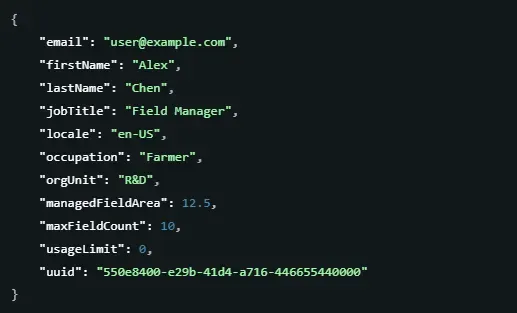
Retrieves the current enterprise account profile, subscription permissions, and quota status.

Scenarios

  • Dashboard Personalization
    Display user context (e.g., "Welcome, Manager Chen") and enforce role-based UI features based on the returned jobTitle or orgUnit .
  • License & Quota Enforcement
    Before initiating a "Create Land" workflow, call this endpoint to check if managedFieldArea has reached the usageLimit . If exceeded, the system can proactively disable the creation button or prompt for an upgrade to prevent API errors.

Output

A user profile record containing identity details, department info, and current system usage limits.
7-1. Get Member Profile

7-2. Update Member Profile

Usage

Updates editable member information, such as job title, department, or language settings.

Scenarios

  • Corporate Directory Sync
    When a user changes departments or titles in your internal HR system, use this API to push those updates to FarmiSpace, ensuring organizational data remains consistent across platforms.
  • User Preference Management
    Allow users to change their interface language ( locale ) or display name directly within your portal, instantly reflecting these changes in the backend profile.

Output

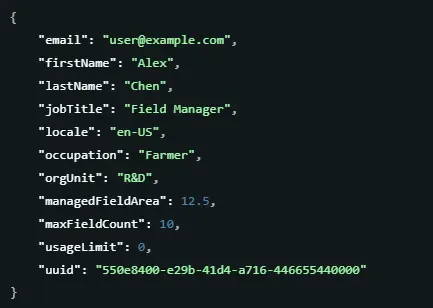
The updated user profile record confirming the successful changes.
7-2. Update Member Profile

8. System Information

💡

Overview

This section provides platform metadata, such as API versions and supported crop lists, typically used for frontend menu initialization.

8-1. Get API Version

Usage

Retrieves the current API service version to confirm the environment status.

Scenarios

  • Health Check & Compatibility
    Verifies that the API service is reachable and running the expected version before executing data synchronization or integration tasks.
  • Debugging
    Provides specific version information to assist in troubleshooting discrepancies or reporting issues to technical support.

Output

Text indicating the current system version number (e.g., "2.0.0").

8-2. List Indices

Usage

Retrieves a list of all available indices along with their descriptions and status.

Scenarios

  • Service Discovery & Capability Check
    Allows the external system to programmatically discover which indices (e.g., NDVI, Biomass index) are currently enabled and available for subscription or display, understanding the specific meaning behind each.
  • Dynamic UI & User Education
    When integrating these indices into a custom dashboard, developers can use the returned desc field to dynamically generate tooltips or help text. This informs end-users about the specific purpose of an index (e.g., using Soil mositure index for water stress analysis) without hardcoding descriptions in the client application.

Output

A catalog list of all available satellite indices, including their display names, descriptions, and active status.
IndexDescription
NDVI(Normalized Difference Vegetation Index)Reflects vegetation coverage and vigor
Biomass IndexAssesses current plant growth from mid-stage onward
Crop Health IndexAssesses crop damage or stress conditions
Crop Nitrogen IndexEstimates relative nitrogen content in plant tissue
Crop Water Content IndexEvaluates relative water content in plant tissue
Soil Moisture IndexReflects surface soil wetness; pre-planting adjustment
Waterbody IndexDetects rivers, ponds, lakes, and other waterbodie
Canopy IndexAnalyzes crop canopy density or tree growth
Seedling Monitoring IndexTracks early-stage crop emergence and development
AI Soil Moisture at 15 cm depth (%)Gravimetric soil water content at 15 cm depth
AI Soil Moisture at 30 cm depth (%)Gravimetric soil water content at 30 cm depth
Soil Organic Carban IndexEstimates the concentration of soil organic carbon to assess soil conditions.
SOC at 15 cm depth (%)The percentage by weight of soil organic carbon content in the topsoil (at a depth of 15 cm).
Forest Stand Volume (m³/ha)Used to reflect the spatial distribution and trends of forest stock volume per unit area.

8-3. Crop List

Usage

Retrieves the full list of crop varieties currently supported by the platform.

Scenarios

  • Dynamic Form Initialization
    When an external system (such as a custom farm management dashboard) creates a new land profile, it calls this endpoint to populate the "Crop Type" dropdown menu with valid options. This ensures users always see the most up-to-date options without needing to update your application code.
  • Standardizing Data Definitions
    Different systems may name crops differently (e.g., "Paddy Rice" vs. "Rice"). This API acts as a dictionary, allowing your product to map your internal crop names to FarmiSpace's standard codes, ensuring seamless data exchange and preventing errors during land creation.

Output

A standard list of supported crop varieties (e.g., Rice, Corn) available for selection in your application.